

OpenVPN vs WireGuard (Blind Spot)
Published: July 25, 2026
Author: Khalil Imitik

Overview
Section titled “Overview”Most of the time, network problems are loud. Services and applications crash, machines become unreachable, monitoring turns red. But this one is different
The VPN just feels slow, Sometimes… Transfers crawl, remote sessions lag, calls/meetings stutter for a bit then recover. You run a speedtest, bandwidth looks fine. You ping the server, also fine, no packet loss. Tunnel says connected. So you blame the internet or whatever is running on the network that day, and move on. That’s how this issue survives for months in a lot of setups, every quick check passes and nothing looks broken
So, in this article I’ll go through how I chased it down properly, what didn’t fix it, and how it ended with dropping OpenVPN for WireGuard, with test results for both
Why The Quick Checks Miss It
Section titled “Why The Quick Checks Miss It”Worth understanding why the usual reflexes see nothing here
- Speedtest measures your raw connection to a nearby test server, usually one hosted at your own ISP or in a datacenter close to you. It never goes through the tunnel, so your internet can be perfect while the tunnel is dying
- Ping sends tiny idle packets. This problem only shows up under load, a 64 byte echo goes through a tunnel that falls apart the moment you push real traffic
Connected just means the control channel works, it says nothing about the data channel under pressure- It scales with workload, so it looks intermittent. Light browsing feels normal, a big transfer chokes
The only thing that exposes it is an actual throughput test through the tunnel, compared against the same test without it
Measuring It Properly
Section titled “Measuring It Properly”Three tools, from the client. ping for latency and loss, mtr to see hop by hop where the path degrades, and iperf3 for throughput
ping -c 50 TARGET_IPmtr -r -c 100 TARGET_IPiperf3 -c TARGET_IP -t 30And every test runs twice
Use the same commands, only try to change the target. And do the comparison between A and B
And here’s what I got 🔎︎
| Without VPN | Through OpenVPN | |
|---|---|---|
| Latency | ~86 ms | ~87 ms |
| Packet loss | 0% | ~0% |
| Throughput | ~120 Mbps | ~15 Mbps |
Latency identical. Loss identical. Every “basic check” number healthy. And most of the throughput is just… gone. Nothing is failing, the tunnel is quietly killing TCP under load
The iperf output shows how
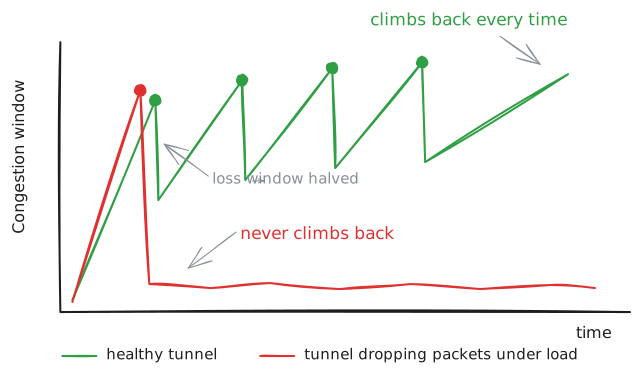
[ ID] Interval Transfer Bitrate Retr Cwnd[ 5] 1.00-2.00 sec 18.6 MBytes 156 Mbits/sec 0 3.02 MBytes[ 5] 10.00-11.00 sec 14.0 MBytes 117 Mbits/sec 625 1.34 MBytes[ 5] 16.00-17.00 sec 0.00 Bytes 0.00 bits/sec 0 79.0 KBytesA burst near line speed, then a wall of retransmits, then the window collapsing to under 100 KB and staying there. Which matches the ~15 Mbps I measured. So something inside the tunnel keeps dropping packets under load and TCP keeps backing off. Now the hunt
What I Tried
Section titled “What I Tried”One change at a time, same iperf test after each. Otherwise you never know which change did what
MSS Clamping (especially for complex infrastructures)
Section titled “MSS Clamping (especially for complex infrastructures)”The classic suspect. The tunnel wraps every packet in its own headers, so there’s less room inside than the usual 1500 MTU. TCP segments that don’t account for that end up fragmented or dropped, which looks exactly like the stalls I was chasing
Cheap to rule out, just cap the segment size under Firewall > Settings > Normalization (on the interface: OpenVPN, for both direction In + Out, With a max MSS: 1360)

Result: 15 >> ~19 Mbps
And honestly, this is where most people stop. It got a bit better, must be “network stuff”, case closed. But 19 out of 120 is still bad, and the retransmit counter actually exploded (from a dozen to over a thousand). TCP was finally pushing and something still couldn’t take it. Keep going
The IPS System
Section titled “The IPS System”If you run an IPS inline, it sits on every packet, and its buffers can silently drop under bursts even when CPU looks fine. Easy to test, just disable it, test or re-run iperf
Nothing changed? So it’s not the IPS, turned it back on! Otherwise, If it had moved, you’d know where to dig, go take a look at the rules and policies you have enabled
Resources
Section titled “Resources”OpenVPN handles a tunnel on a single core, so it can hit its limit while the rest of the box looks idle. Run it on the machine during an iperf
top -aSH -P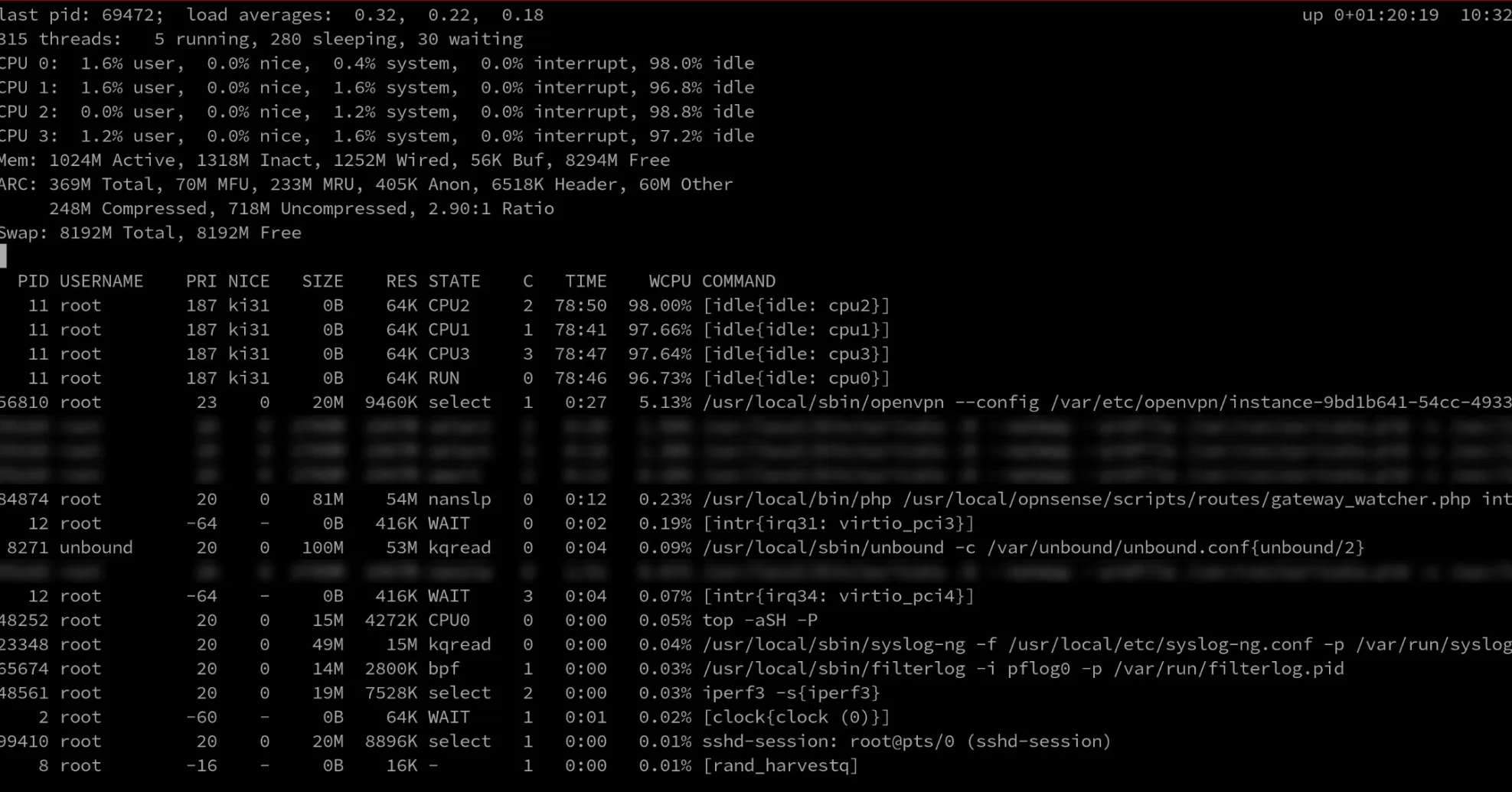
In the screenshot above, the openvpn process was sitting around 5%, every core basically idle. So.. not CPU bound
And just to be sure, I threw more at it anyway, extra cores, more memory, swap enabled. Same numbers. It really wasn’t resources
Hardware Offloads
Section titled “Hardware Offloads”Virtio NICs on BSD based firewalls have a long history of broken checksum/TSO/LRO behaviour, a known source of silent drops. Interfaces > Settings, check the three “Disable hardware…” boxes, save, reboot the VM (they only apply after reboot)

No change either :)
Trying WireGuard
Section titled “Trying WireGuard”OPNsense ships WireGuard natively, so putting it up next to the existing OpenVPN takes maybe 20 minutes and you’re not committing to anything
/32, keepalive 25
wg-quick up, then run the same tests on both tunnels back to back
iperf3 -c TUNNEL_IP -t 120 # upload, single streamiperf3 -c TUNNEL_IP -t 120 -R # download, single streamiperf3 -c TUNNEL_IP -t 60 -P 4 # upload, 4 parallel streamsiperf3 -c TUNNEL_IP -t 60 -P 4 -R # download, 4 parallel streamsResults
Section titled “Results”Everything in this table goes through the tunnels (VPN up, targeting each tunnel IP). Same link, same firewall, same hour, only the protocol changes. The no VPN baseline to keep in mind as the reference: ~120 Mbps
| Test | OpenVPN | WireGuard |
|---|---|---|
| Upload, single stream, 120s | ~106 Mbps | ~97 Mbps |
| Download, single stream, 120s | ~6 Mbps | ~92 Mbps |
| Upload, 4 streams, 60s | ~121 Mbps | ~128 Mbps |
| Download, 4 streams, 60s | ~18 Mbps | ~115 Mbps |
Two things here
After days of investigation & testing, the thing I kept coming back to was the retransmits, and a congestion window that never recovered. Packets were getting dropped somewhere inside OpenVPN
Where exactly, I don’t know. OpenVPN just does more per packet, more stages between the tunnel and the wire, and every stage is somewhere a packet can be dropped under load. WireGuard’s path is shorter. That’s ~4k lines of code against OpenVPN’s ~100k+, the same story from a different angle. Could also be how any of that interacts with a virtualised network stack
Either way, I stopped digging once WireGuard did the same job without the problem
Where OpenVPN Still Wins
Section titled “Where OpenVPN Still Wins”To be fair, this article is about throughput on a long link. That’s one criteria
It’s not that OpenVPN is bad, it’s just the wrong tool when you want throughput over a high latency link
And hopefully it helps ✌︎㋡
