

Proxmox Backup Server + Cloudflare R2
Published: December 23, 2025
Author: Khalil Imitik

Overview
Section titled “Overview”Proxmox Backup Server is a robust backup solution for Proxmox VE that enables scheduled backups of your virtual machines and containers. It serves as a critical component of your disaster recovery strategy, ensuring you can restore your infrastructure after hardware failures, data corruption, or accidental deletion
Features
Section titled “Features”Incremental Backups with Deduplication
Section titled “Incremental Backups with Deduplication”PBS divides each guest into small data chunks, naming each chunk using a hash of its contents. During backups, PBS compares these hashes to identify and skip duplicate data, storing only what’s new or changed.
Why this matters: Without deduplication, storage consumption grows rapidly.
For example, 10 VMs running the same OS (3.5 GB each) would require 35 GB without deduplication just for the operating system. But with deduplication feature, PBS stores the base OS once plus only the unique data per VM, saving approximately 31.5 GB. Actual savings depend on your deduplication ratio.

Client-Side Encryption
Section titled “Client-Side Encryption”For extra security beyond TLS connection, enable encryption only when your VMs or LXC containers hold sensitive data or operate in restricted environments. Adds a bit of overhead, but that’s a fair trade for peace of mind.
Data Integrity Verification
Section titled “Data Integrity Verification”Every chunk is named by its SHA256 hash, making corruption instantly detectable. You can schedule verification jobs to periodically re-check all chunks, or enable “Verify New” to validate each backup right after creation. If something’s off, PBS flags it and the next backup naturally re-uploads the chunk
Flexible Recovery Options
Section titled “Flexible Recovery Options”Restore entire VMs/containers, or skip the full restore and grab just the files you need. For VMs, use the file restore button in PVE to browse partitions Linux/Windows and download individual files
Before You Ask…!
Section titled “Before You Ask…!”Yeahh! A lot of questions might come to mind, is it reliable? Is it fast enough for backups and restores?
Well, this feature landed in ver. 4.0 and still maturing, but it’s been rock solid for me so far. As for speed, I ran some tests against the Cloudflare endpoint, to calculate or at least evaluate performance (details in setup)
So… let’s dive in!
We’ll cover connectivity, configs, and a few considerations along the way
R2 Bucket
Section titled “R2 Bucket”Head to your Cloudflare dashboard and navigate to Storage & Databases > R2 Object Storage > Overview. Create a new bucket for your backups.
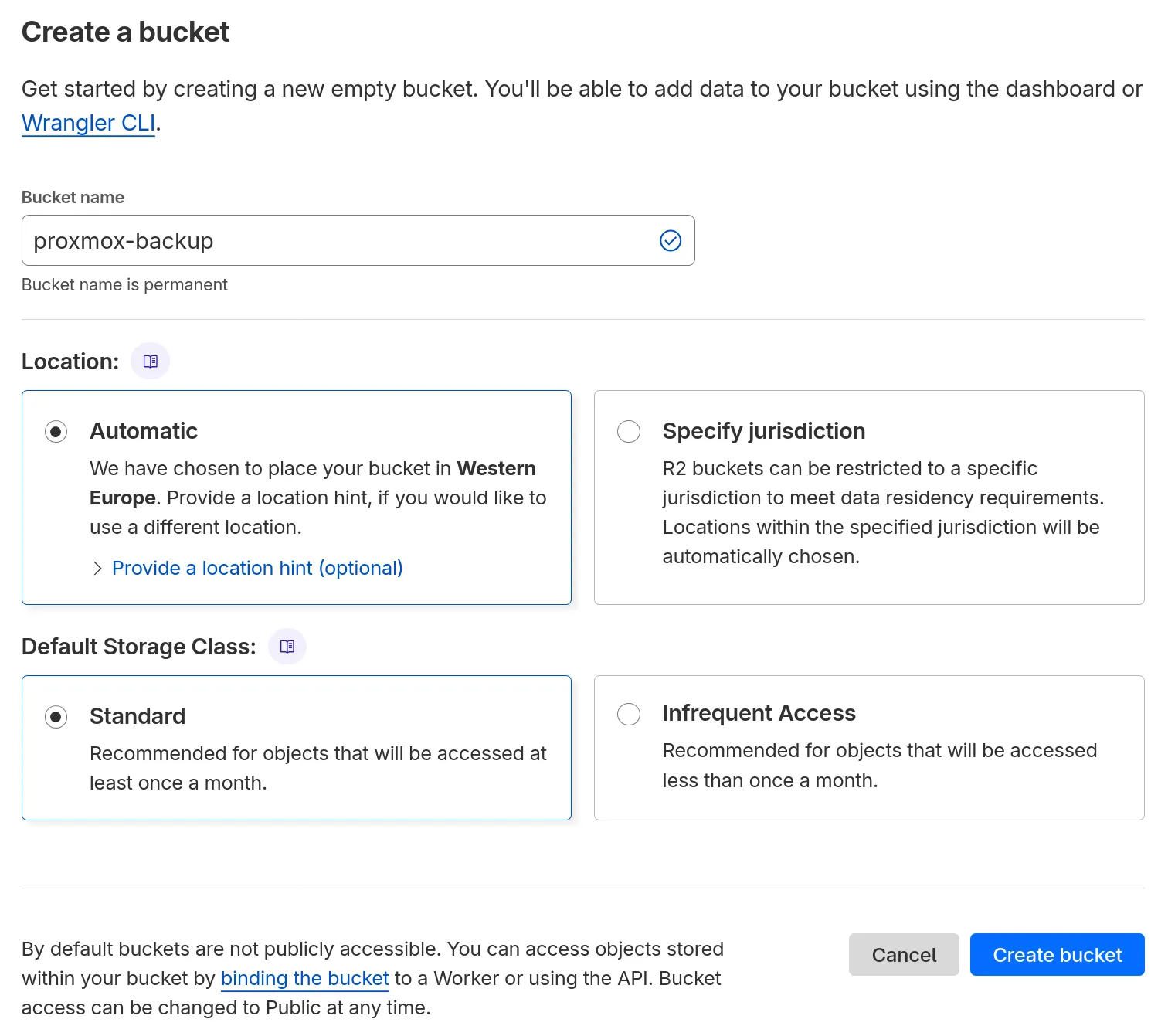
Dedicated API Token
Section titled “Dedicated API Token”On the same R2 overview page, go to API Tokens and create a new account api token with “Admin read & write” permissions, Why? because PBS needs to list all buckets, and “Object Read & Write” with a single bucket scope won’t work, otherwise you’ll get a 400 error as status code, but still you can restrict access by allowing only your server’s IP. Save the credentials generated!
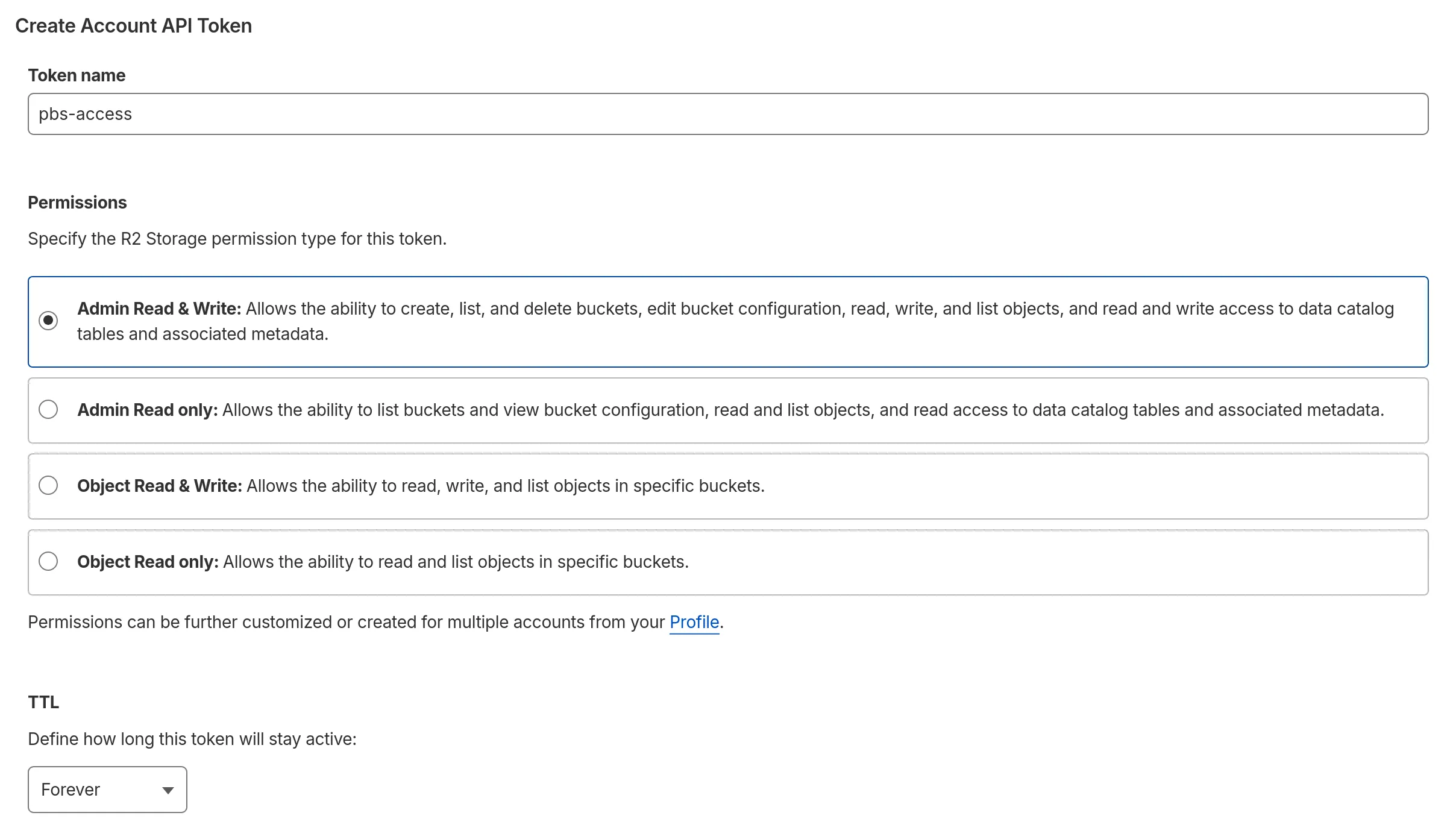
Object Storage with Proxmox Backup Server
Section titled “Object Storage with Proxmox Backup Server”Now, switch to the PBS UI and link your S3 endpoint:
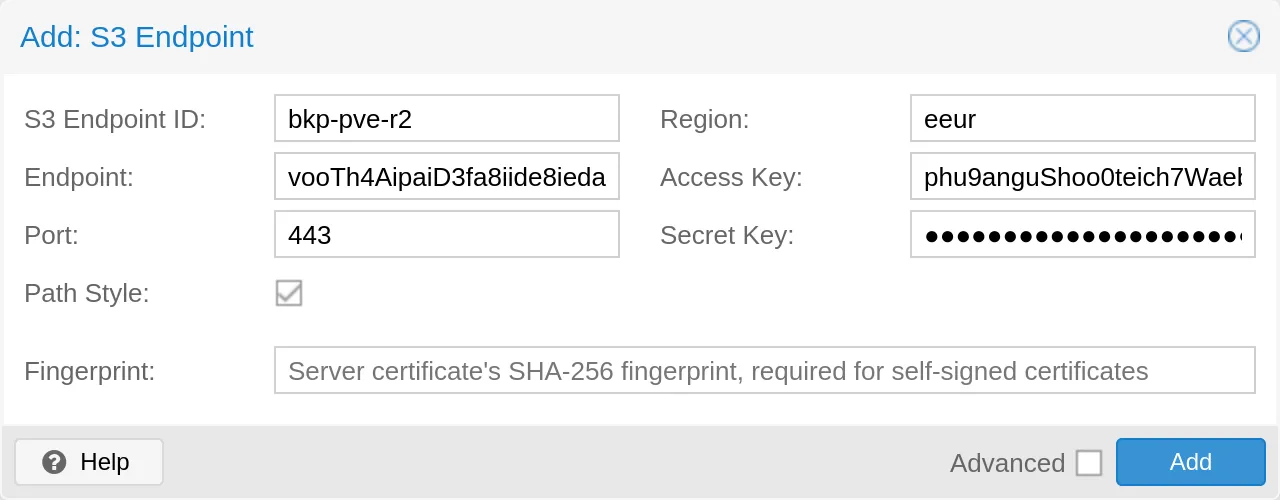
Bucket as Datastore
Section titled “Bucket as Datastore”Then add a datastore and specify which bucket to use:
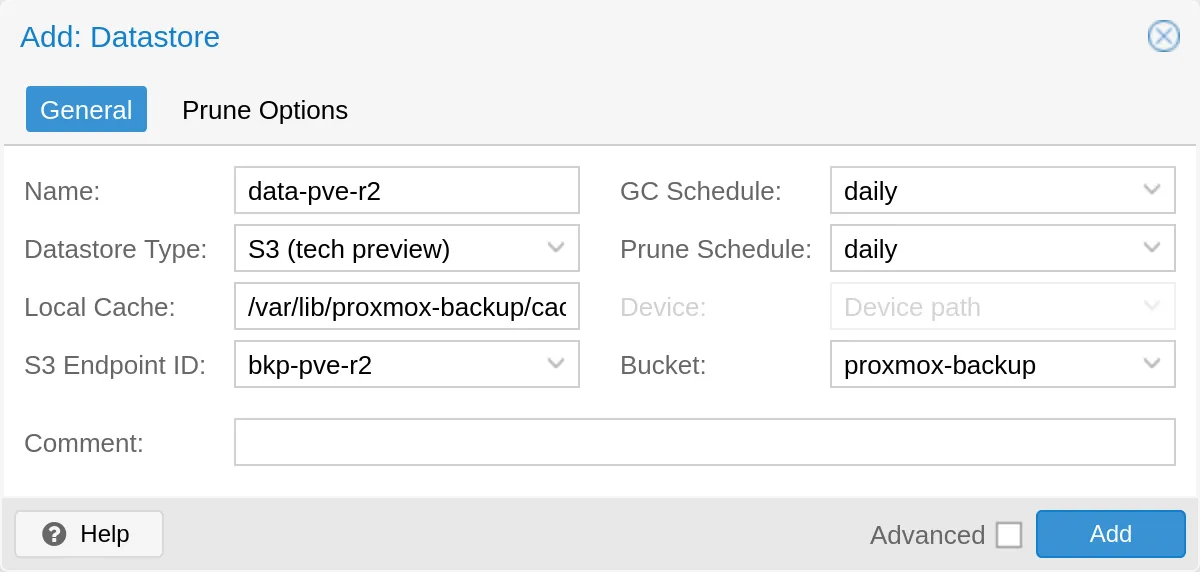
Backup Schedules
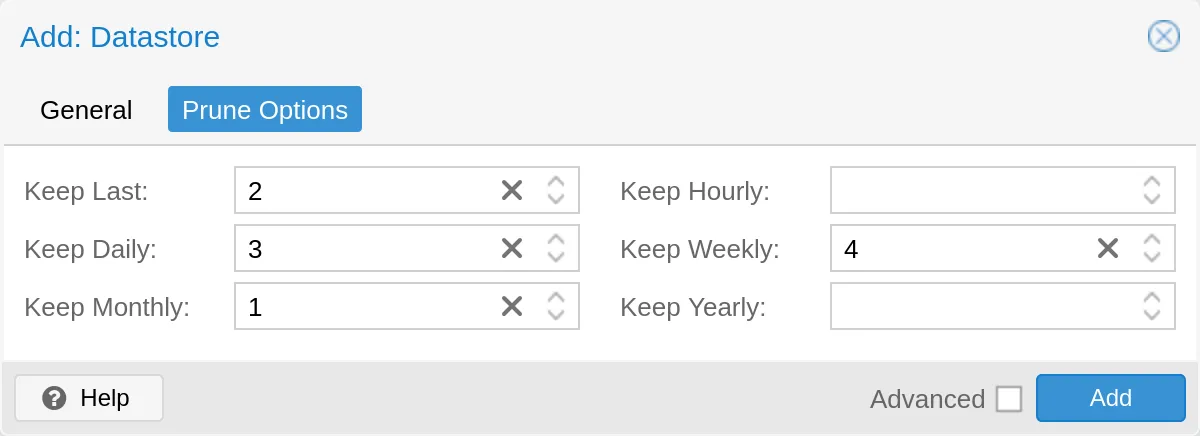
Section titled “Backup Schedules”Move into the prune options to define how long backups stick around. You can also manage this from PVE later
PBS with PVE
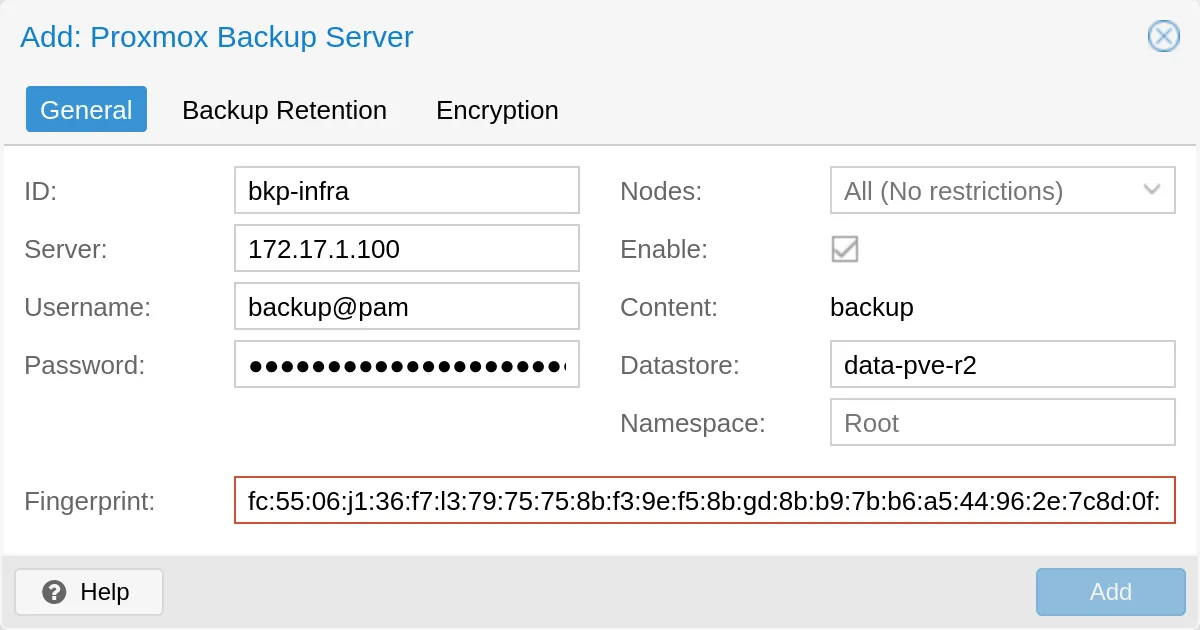
Section titled “PBS with PVE”To link PVE with PBS, add it as storage under Datacenter > Storage
Backup Job
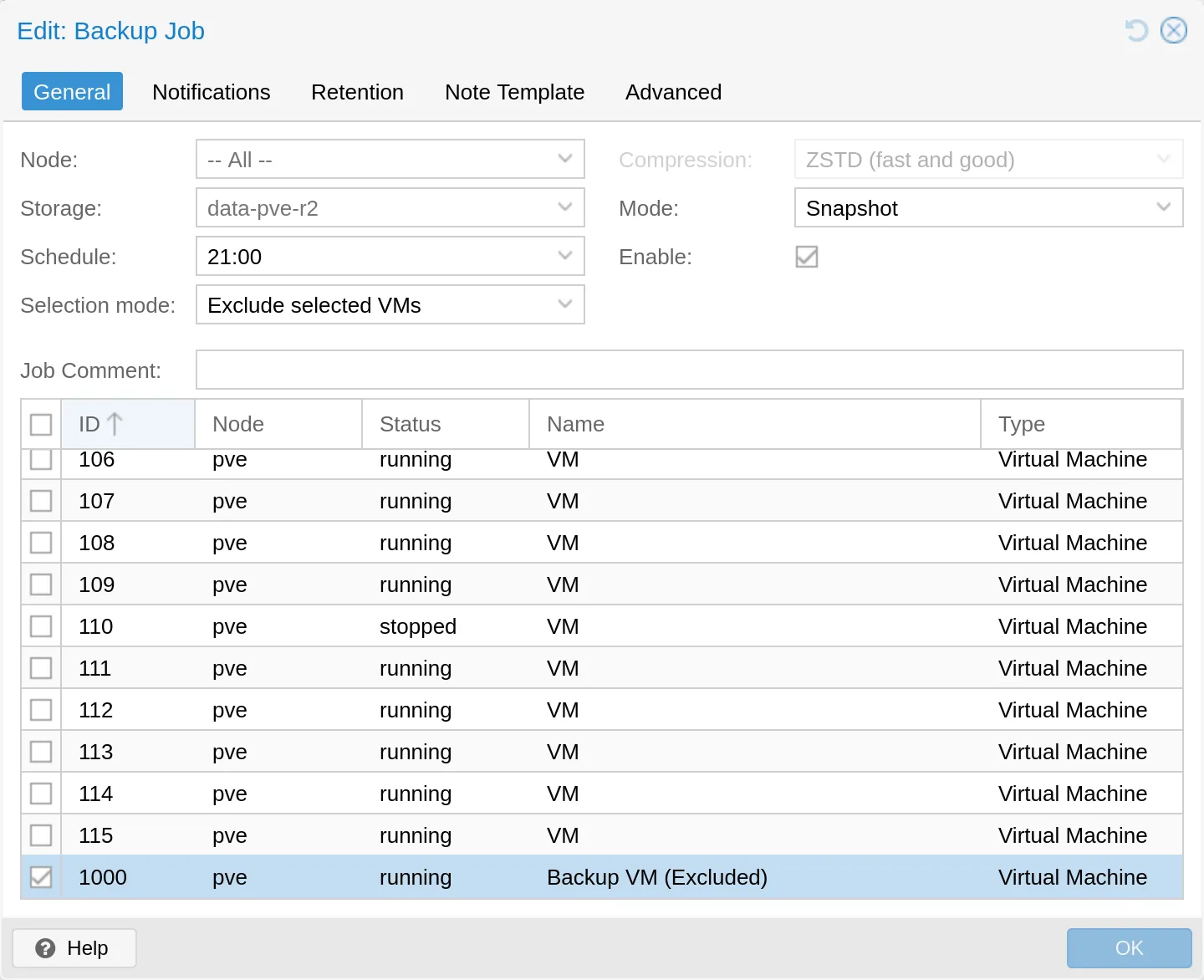
Section titled “Backup Job”Last but not least, add/adjust your backup job under Datacenter > Backup
Backup Speed
Section titled “Backup Speed”Now that everything’s set up, let’s see how fast it actually runs. Here’s a quick benchmark against Cloudflare
curl -o /dev/null https://speed.cloudflare.com/__down?bytes=100000000 % Total % Received % Xferd Average Speed Time Time Time Current Dload Upload Total Spent Left Speed100 95.3M 0 95.3M 0 0 79.5M 0 --:--:-- 0:00:01 --:--:-- 79.6Mdd if=/dev/zero bs=1M count=100 2>&1 | curl -X POST -T - https://speed.cloudflare.com/__up -o /dev/null % Total % Received % Xferd Average Speed Time Time Time Current Dload Upload Total Spent Left Speed100 100M 0 0 0 100M 0 59.9M --:--:-- 0:00:01 --:--:-- 59.9MAnd that’s it!
